A print artwork approval checklist should name the file supplied, the checks your team performs, what the proof represents, who may approve it, and which changes require a new proof. Record approval before production begins. Publish the ordinary process clearly, while leaving file-specific quality and deadline decisions to a person.
Artwork approval is the point where a custom print request becomes a production instruction. A good checklist tells the customer what to inspect, how to request a correction, and what their approval allows the workshop to do. It should not ask them to approve an unnamed file through a vague “looks fine” message.
Use the structure below for business cards, invitations, labels, booklets, banners, or another printed item. Replace every bracket with the workshop's real process.
What should the workshop record before sending a proof?
Give the proof an identity that both sides can recognize. Record the customer's name or order reference privately, then name the item, quantity, size, material, finishing, and artwork version in the message that accompanies the proof.
Check the submitted file against the requirements your workshop actually uses. That may include dimensions, page count, image placement, margins, and whether every expected element is present. Do not describe a technical check your team does not perform.
Keep a note of any instruction supplied outside the artwork. A customer may have requested rounded corners, a fold, numbering, or a different material in a phone call. The approval message should bring those decisions beside the proof rather than leave them in a separate conversation.
Copy this artwork approval checklist
Proof for [printed item and artwork version]
Please check the [names, phone numbers, dates, prices, addresses, spelling, image placement, page order, size, and other relevant elements].
Order details: [quantity], [finished size], [material], and [finishing].
This proof shows [state exactly what it represents]. It does not show [any limitation the customer genuinely needs to know].
To request a correction, reply with [how to identify the page, side, or element] and the exact replacement.
We will send a new proof after a change to [the elements that require another approval].
Production begins only after [approved person or role] confirms this version through [accepted approval method].
Avoid “check everything carefully” as the only instruction. A customer is more likely to catch a wrong date when dates are named. They are more likely to notice that a second side is missing when page or side order appears on the list.
The line describing what the proof represents matters too. If a digital proof does not demonstrate a physical finish or an exact material result, the workshop should state its real limit in words approved by the team. Do not copy a warning from another printer whose production process may differ.
Which changes need a fresh approval?
Separate a correction from approval. If the customer replaces a phone number, moves an image, changes a page, or alters the quantity in a way that affects layout, send the revised version back through the stated check. Do not rely on an earlier “approved” message for a file that no longer matches it.
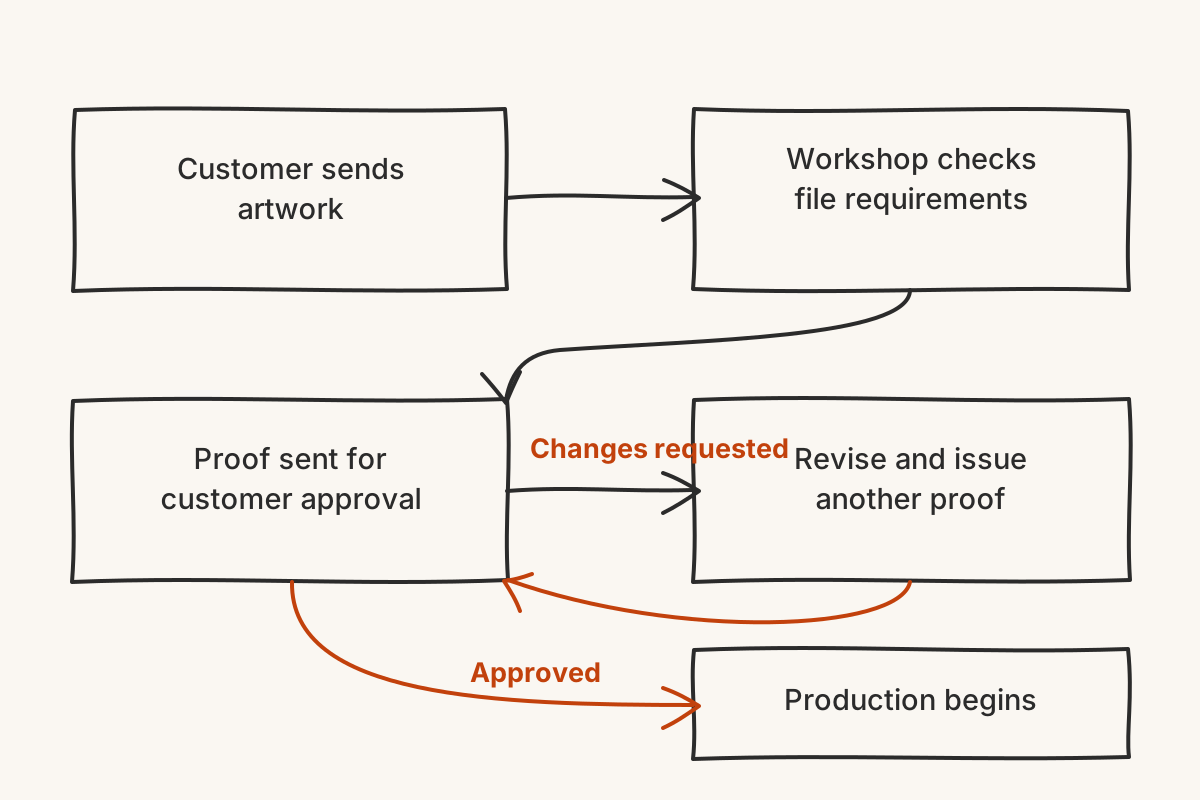
The sequence should stay visible: Customer sends artwork. Workshop checks file requirements. Proof sent for customer approval. If Changes requested, revise and issue another proof. If Approved, Production begins.
Define who can approve. For a business order, the person sending artwork may not be the person authorized to confirm production. Naming the approver prevents a casual comment from being treated as a final instruction.
Also decide how approval is captured. Use the channel and wording the workshop can retrieve later. The checklist is evidence of a decision, not merely a way to make the exchange feel formal.
How can Chatterbox answer questions about the approval process?
Publish the ordinary steps in one maintained place. Chatterbox can use material from a site crawl, uploaded file, pasted text, or hand-typed Q&A, and it shows the source passage behind an answer. A visitor can then ask what to check, whether corrections receive another proof, or when production starts.
Questions about one artwork file still belong with the workshop. The public process cannot establish whether an image is usable, whether a correction was received, or whether an order has entered production. When the supplied material does not answer, Chatterbox says it cannot find the answer and asks for the visitor's name, phone, and email. The lead reaches the dashboard and by email for a person to handle.
Test the published instructions with one ordinary process question and one file-specific question. The first should point back to the maintained checklist. The second should preserve the uncertainty and collect contact details rather than announce an approval or production status.
A useful artwork checklist does not guarantee that every file is ready. It makes the approval decision identifiable, repeatable, and easy to hand back for correction before the press starts.