Chatterbox can answer what-is-included questions from service or package details your business has published. It can repeat the stated scope and conditions. If the material does not settle whether an add-on, custom request, or unusual case is included, it asks for contact details instead of turning a standard package into a promise.

“Is installation included?” is not a request for a longer sales description. It is a request for the edge of the price. Chatterbox can point to the scope a business has published. It should not quietly widen that scope when the visitor names an extra the page never covered.
Why does “included” need its own answer?
A price without a scope invites the customer to complete the offer in their head. A tailor may mean that a quoted alteration covers one fitting. The customer may assume it also covers new material and a second visit. Both people can repeat the same price while imagining different work.
That misunderstanding is expensive because it appears late. The visitor may discover the difference after traveling to the shop, approving the job, or arranging a date. A clear inclusion answer moves the boundary to the moment when they are still deciding.
Separate four ideas that short package copy often compresses:
- the core work or item;
- the quantity, visit count, or service period;
- the condition attached to the inclusion;
- the common extra that receives a separate quote.
The last line is not negative copy. It helps the visitor recognize when their request has moved beyond the standard offer.
What should you publish for each service package?
Give every named package a compact scope card. Use the same five fields even if the answers are brief:
Package. Use the exact name shown beside the price.
Included work. Name the tasks, materials, or deliverables the team will provide as standard.
Limit. State the count or boundary that matters: one visit, two revisions, a named area, or a stated size.
Customer provides. Record anything the price assumes the customer will supply or arrange.
Quoted separately. Name the frequent add-ons without guessing what those add-ons will cost.
For example, a tailoring shop could describe a basic trouser alteration as shortening one plain hem after one fitting, with replacement zips, lining repairs, reshaping, embroidery, and fabric charged separately. A customer can then distinguish a hem from a reconstruction before bringing the garment in. The example works because each noun corresponds to work someone at the counter can identify. “Minor adjustments included” would not draw the same boundary.
A tuition center needs different nouns: subject, class length, number of sessions, study material, doubt-clearing time, and test review. A design studio might use concept, revision round, final file, printing, and licensing. A bicycle workshop might separate brake adjustment, cable replacement, wheel truing, spoke replacement, and new components. The format stays stable while the contents remain specific to the service being sold.
Keep each condition beside the item it qualifies. “Delivery included” and “delivery included within the listed area” are different offers. “One consultation included” does not establish that follow-up work is free.
Put the approved card where the business will maintain it. Chatterbox can receive knowledge through a website crawl, file upload, pasted text, or hand-typed Q&A. Whichever route you choose, avoid leaving yesterday's package description active elsewhere.
How does Chatterbox treat an unlisted extra?
The visitor's question falls into one of three buckets.
A direct match names something in the scope card. Chatterbox can return that published detail and display the source passage behind it.
A conditional match names an inclusion but changes a limit. Delivery may be part of the package only inside the stated area. The answer needs the boundary, not the attractive half of the sentence.
An unlisted extra has no settled answer in the supplied material. Another fitting, a different material, an additional location, or a custom combination may change the work. Chatterbox would rather say it cannot find the answer than present the standard package as approval for the altered request.
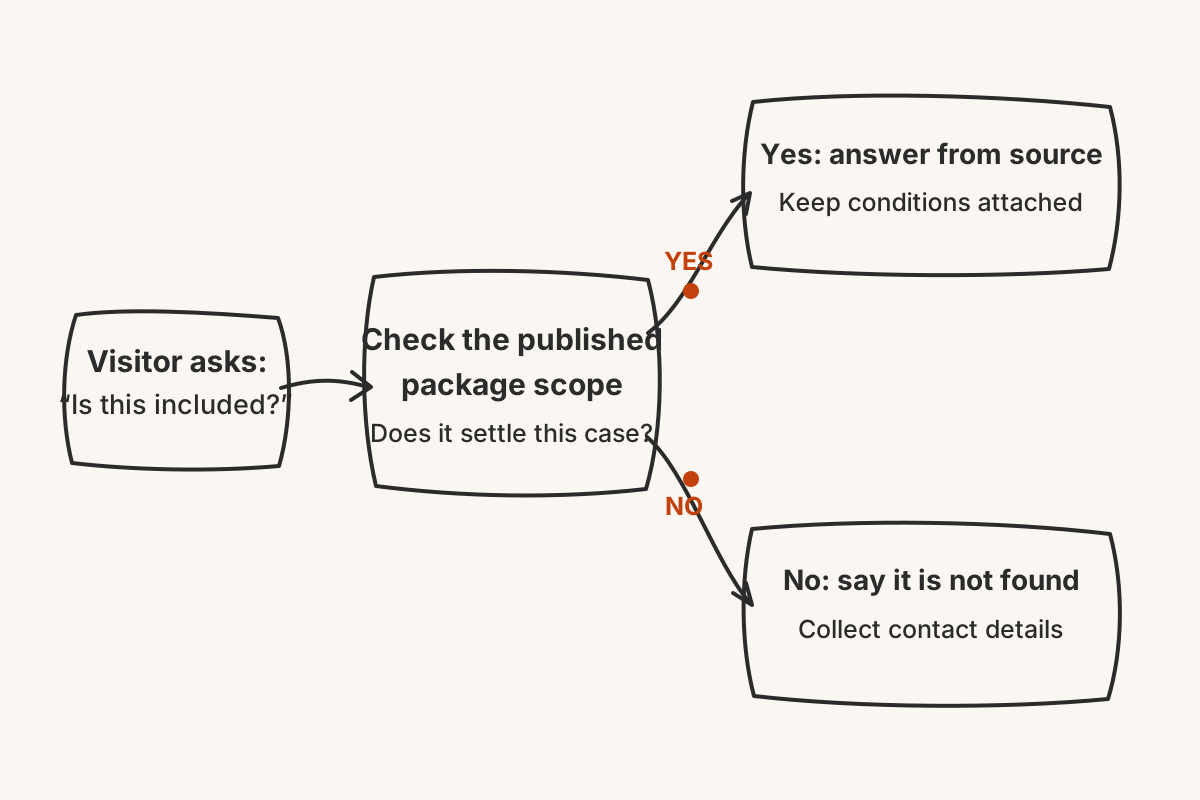
At that point it requests a name, phone number, and email. The enquiry appears in the dashboard and is also sent by email. The team receives the question before making a commitment and can prepare the right quote.
The sequence matters. A broad “yes” cannot be repaired by asking for a phone number afterwards. The expectation already exists. The safer route is to expose the missing scope first, then hand the decision to someone who can inspect the request.
Which checks keep package answers honest?
Build a three-question check for every scope card.
First, ask about one item that is clearly included. Follow the displayed source passage and confirm that it points to the correct package rather than a similar offer.
Second, cross the published limit by one step. Add a visit, move outside the named area, or request one more revision. The reply should preserve the limit instead of dropping it from the answer.
Third, ask for a common add-on whose price depends on the job. This is where an honest refusal and contact capture are more useful than a smooth estimate.
Repeat the check whenever the offer changes. Correct the maintained card, search the other source types for stale copies, and then refresh the website source if that is where the package lives. Chatterbox permits one re-crawl per source each day.
A strong package page does not try to anticipate every custom request. It makes the standard offer precise, marks the edge, and leaves the work beyond that edge open for a person to price.