After changing a price, policy, service area, or opening time on your website, refresh the matching chatbot source and test the changed answer. Chatterbox can re-crawl a website source once a day. Check the source passage, then ask an edge-case question that should still reach a person.
Changing the website is only the first half of updating a website chatbot. A new price can be live for customers while the chatbot still has the older crawl. Refresh the source that carries the fact, then prove that the answer changed before leaving the widget unattended.
What needs updating when website content changes?
Start with the fact, not the whole site. Write down exactly what changed and where the approved version now lives. It might be a service price on a public page, a cancellation condition in an uploaded document, a preparation note in pasted text, or a hand-typed question-and-answer pair.
Chatterbox builds knowledge from those four source types: a site crawl, file upload, pasted text, and manual Q&A. Updating one does not make a duplicate in another disappear. If an old rate remains in a document after the website changes, the business still has two conflicting sources.
Search every maintained source for the old fact. Replace or remove it rather than adding a second version with a newer date. The safest knowledge base has one clear home for each answer.
Which Chatterbox source should you refresh?
Refresh the source that the business treats as authoritative. If customers can read the answer on a public page, update that page first and re-crawl its website source. If staff maintain the rule in a document, replace the uploaded material with the approved version. Edit pasted text or manual Q&A when either is the primary home.
Do not move a fact merely because another source is quicker to edit. Copying a new price into manual Q&A while leaving the old pricing page live creates a maintenance problem for the next change. The chatbot may have more material, but the business has less certainty about which statement is current.
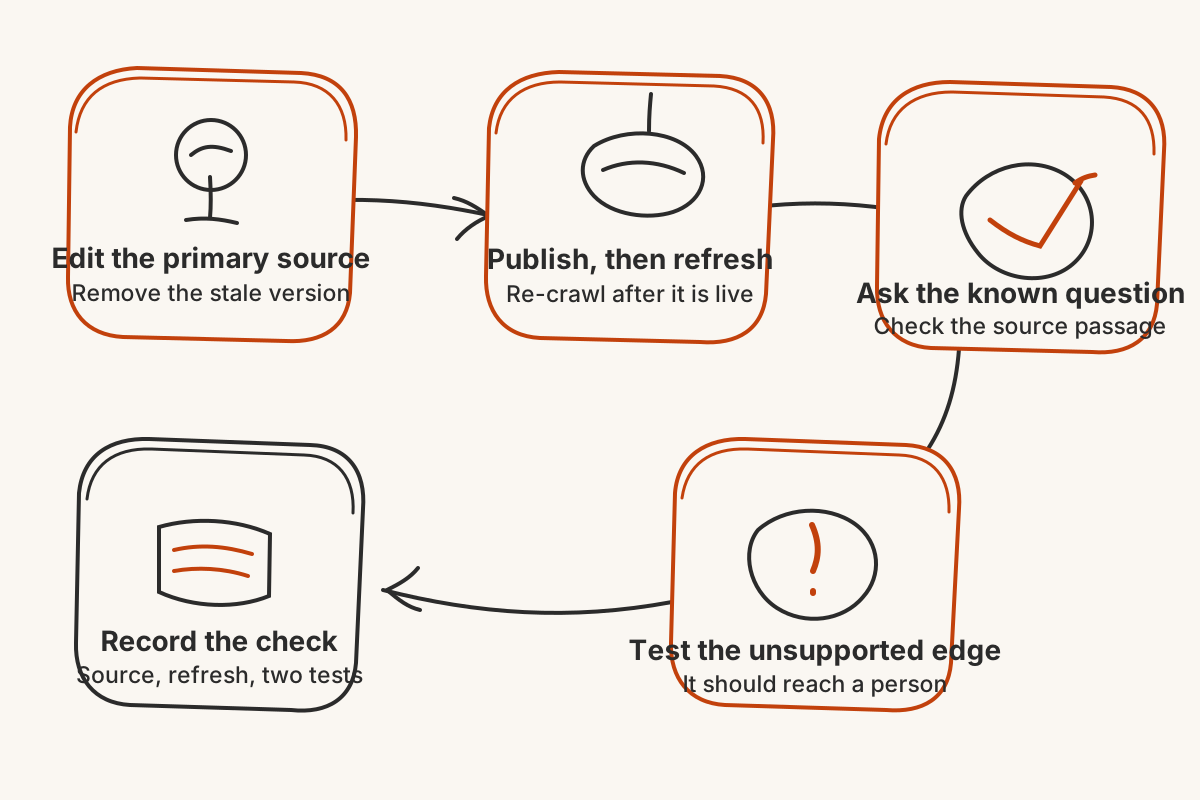
The sequence below keeps the change tied to one source and one test.
When should you run the website crawl again?
Run the crawl after the changed page is publicly available. Open the live URL first. Confirm that caches, staging deployments, or an unfinished publish have not left the old version online.
Chatterbox allows a website source to be re-crawled once a day. Group related edits before using that refresh. If prices, hours, and a policy all need correction, publish the complete approved set, then re-crawl. Repeatedly changing one page after another can leave you waiting for the next available refresh.
A crawl also depends on access. ChatterboxBot obeys robots.txt. If the website source fails to refresh, check that the public page still loads and that crawler rules have not changed before rewriting a correct answer.
How do you check the old chatbot answer is gone?
Ask the exact customer question that exposed the stale information. Chatterbox shows the source passage behind an answer, so check both the reply and the passage. The right sentence coming from the wrong old source means the cleanup is not finished.
Then change one condition. If the new policy covers cancellations before a deadline, ask about a cancellation after it. If the new service area lists a town, ask about a nearby place it does not mention. When the source does not settle the case, Chatterbox should say it cannot find the answer and ask for contact details rather than extending the new rule.
Keep a short record of the changed fact, its primary source, the refresh date, and the two questions you tested. You do not need a large audit for every edit. You need proof that the known answer moved and the unknown edge still reaches a person.
A content change is finished when the live source is current, stale copies are gone, the chatbot cites the intended passage, and the next unsupported variation produces an honest handoff.