Chatterbox can answer product compatibility questions when your business's supplied material names the exact products, models, sizes, or conditions that work together. If the content does not settle a visitor's combination, it asks for contact details instead of turning a similar model into a fit guarantee.

A shopper already has one item in front of them. They are not asking what an adapter, filter, refill, or replacement part does. They want to know whether the exact one on your site belongs with the exact model at home. That question needs a pair of identifiers, not a broad product description.
Which details make a compatibility answer usable?
Build every compatibility entry around two named sides: this item and works with. Record the customer-facing name and code for the item being sold. Then list the supported model, size, generation, connector, production year, or other identifier that decides the match.
Add three more fields when they matter:
- Does not work with: a similar version customers often confuse with the supported one.
- Condition: an extra requirement, such as a particular capacity or revision.
- Where to check: the place a customer can find the identifying detail on what they own.
“Universal,” “standard fitting,” and “works with most models” should appear only when the business can stand behind those words. Otherwise they hide the exact edge the shopper came to find. A family name is not a substitute for a model list when different generations use different connections.
Keep the positive match and its exception together. If one page says an attachment supports the R20 range while another says models made before a certain year are excluded, either page can be read without the condition that changes the purchase.
How should you organize a product compatibility list?
Use one row or short block per item. A practical structure is:
Item: [customer-facing item name and code]
Works with: [exact models, versions, or sizes]
Does not work with: [commonly confused models]
Check before buying: [identifier and where to find it]
If your model is not listed: [contact route for confirmation]
Write codes exactly as they appear on the product. Preserve spaces, hyphens, and suffixes. “AB-40” and “AB-40S” may look close in a sentence while describing different hardware. Do not shorten a list to “all AB models” merely to make the copy easier to scan.
Choose one owner for the list. That might be the product page, a dedicated compatibility guide, or an approved document. An old guide should not remain available beside a corrected page. The business then has one place to add a new model and one place to withdraw an earlier match.
What happens when the visitor's model is absent?
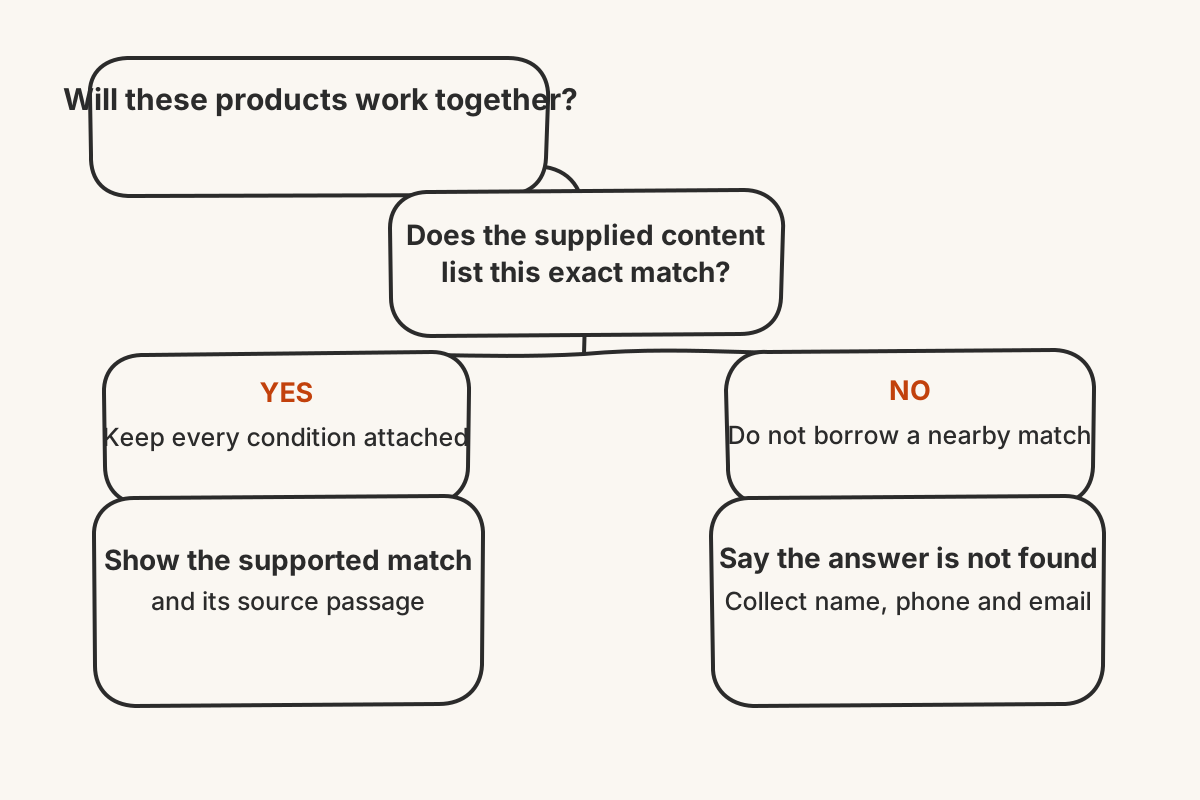
Chatterbox can use a website crawl, uploaded file, pasted text, or hand-typed Q&A as business material. When a listed pairing supports the question, it can surface that pairing and show the source passage. The shopper can compare the identifiers rather than rely on an unsupported “yes.”
An absent model is not a near match. The difference may be one letter, a regional version, a connector hidden from view, or a revision the compatibility guide has never assessed. In that situation, Chatterbox says it cannot find the answer and requests a name, phone number, and email. The enquiry reaches the dashboard and by email for someone to check.
That sequence avoids a costly reversal. Asking for contact details after “this should fit” does not take the suggestion back. The safer response leaves the packaging closed and the combination undecided.
Which checks catch a false compatibility promise?
Create three test questions from the list. The first names a supported pairing. Its reply should retain the full code and any condition attached to it. The second names a documented exclusion. It must not return the broad family description and omit the distinguishing suffix, size, or year.
For the third, invent no answer: ask about a combination that the material never records. The useful result is an admitted gap and contact capture. Similar spelling is not evidence of physical or technical fit.
Run the same checks after adding a model, changing a component, or replacing the guide. If the list lives on the website, publish the correction before refreshing its source; Chatterbox permits one re-crawl per source each day. Remove superseded copies from the other source types as well.
A clear compatibility page helps the known pair reach the basket and keeps the unknown pair out of it. It does not try to turn every resemblance into approval.