A website chatbot privacy notice should explain what visitors may type, which contact details the widget requests, why a person receives them, and where to find the full privacy policy. Verify retention, sharing, cookies, and visitor-rights wording for your own setup instead of copying promises your business cannot confirm.

A privacy notice beside a website chatbot should tell a visitor what happens before they type, not bury the explanation after they leave a phone number. Keep the short notice readable on a phone. Link it to the business's full privacy policy for details that depend on the business, its provider, and the law that applies.
This is a writing template, not legal advice. Replace every bracketed instruction with verified information. Do not copy a retention period, hosting location, certification, or legal right from another company's notice.
What should a chat widget notice explain before someone types?
Start with the information a visitor can see themselves supplying: their question and any details they choose to include in it. Ask people not to put payment credentials, passwords, identity documents, medical records, or other unnecessary sensitive information into an ordinary pre-sales conversation.
Then explain the purpose in plain language. The widget uses the business material supplied to it to answer questions. In Chatterbox, that material may come from a site crawl, uploaded file, pasted text, or hand-typed question-and-answer pair. Each answer shows its source passage. When the material does not settle the question, the widget asks for contact details so a person can follow up.
Do not write “we collect only what is necessary” unless somebody has checked every enabled field and the conversation data the service retains. Name the fields you know instead.
Copy this short chatbot privacy message
Use this close to the chat entry point or before the first request for personal details:
Before you chat
You can ask questions about [business name, services, products, or policies]. Please do not include passwords, payment details, identification documents, or other sensitive information in your message.
The chat uses information supplied by [business name] to answer. If it cannot find a clear answer, it may ask for your name, phone number, and email so a person can follow up.
We use the information you provide to [answer the enquiry and describe any other verified purpose]. Read our [privacy policy link] for details about [who handles the information, retention, sharing, and how to contact the business].
Keep the link label descriptive. “Privacy policy” is clearer than “learn more.” If the visitor must accept terms before submitting details, have the business's adviser confirm the wording and interaction rather than adding an unchecked consent sentence to this template.
What happens after Chatterbox cannot answer?
Chatterbox says it cannot find the answer instead of inventing one. Its lead capture requests a name, phone number, and email. The lead reaches the Chatterbox dashboard and is also sent by email for a person to handle. The widget captures the number; it does not call the visitor or place them into a live-agent conversation.
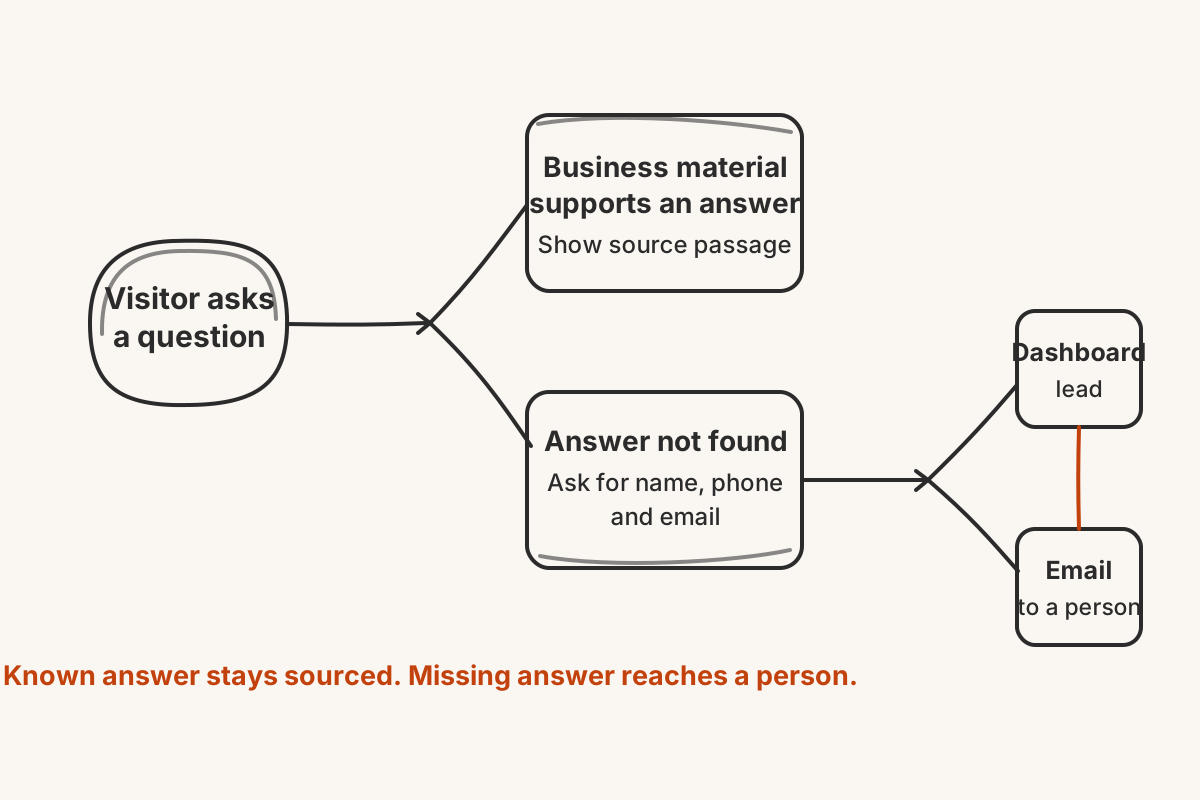
That route should be visible in the full policy. Name the people or team that actually receive the notification. Check which inbox gets the email and who can open the dashboard. A notice that says “our team” is not operationally useful if nobody knows which team owns the reply.
Do not promise a response time unless the business can keep it. Privacy wording and callback wording serve different jobs: one explains the handling of information, while the other sets an expectation about service.
Which details must your business verify before publishing?
The template deliberately leaves some facts blank because they cannot be inferred from a chat widget's feature list. Confirm them for the business's real setup:
- the legal identity and contact details of the business responsible for the information;
- the purposes for which questions and lead details are used;
- who can access the dashboard and notification inbox;
- how long conversations and lead details are kept;
- whether information is shared with other providers;
- whether the widget sets cookies or uses similar browser storage;
- which visitor choices or rights apply, and how a request is made;
- any country-specific wording the business is required to provide.
Check the short notice against the full policy line by line. Then test both paths: ask a question the supplied material answers and inspect the source passage, followed by a question it does not answer and review the contact request. Use test details you control. Confirm where the lead appears and remove the test record through the process your business has approved.
A good chatbot privacy notice makes the handoff unsurprising. It tells the visitor what they may share, why contact details are requested, and where to read the facts that cannot fit inside a small chat window.