If a website chatbot crawl fails or returns nothing, check robots.txt before changing the chatbot. ChatterboxBot obeys that file, and a rule that blocks it—including a blanket block for all crawlers—stops the crawl before it starts. Add a specific allow rule, then run the crawl again.

A website chatbot cannot answer from pages its crawler was not allowed to read. When a Chatterbox crawl fails at the start or returns nothing, check the site's robots.txt file before rewriting content, buying more crawl pages, or reinstalling the widget.
Is robots.txt stopping the chatbot crawl?
Open https://yourdomain.com/robots.txt in a browser. You are looking for rules that apply to ChatterboxBot, the crawler Chatterbox uses to read website sources.
A direct block is easy to recognize:
User-agent: ChatterboxBot
Disallow: /
The broader version is easier to miss:
User-agent: *
Disallow: /
That asterisk applies the rule to all crawlers covered by the file. ChatterboxBot obeys robots.txt, so either form stops the crawl before it starts. The second rule is common on staging sites that were deliberately kept out of search and then moved into production without revisiting the file.
Do not assume the chat widget and the crawler are the same check. The widget can appear on a page because its script tag is installed while the knowledge crawl still has no permission to read the site.
What rule allows ChatterboxBot to read the site?
Chatterbox's published allow rule is:
User-agent: ChatterboxBot
Allow: /
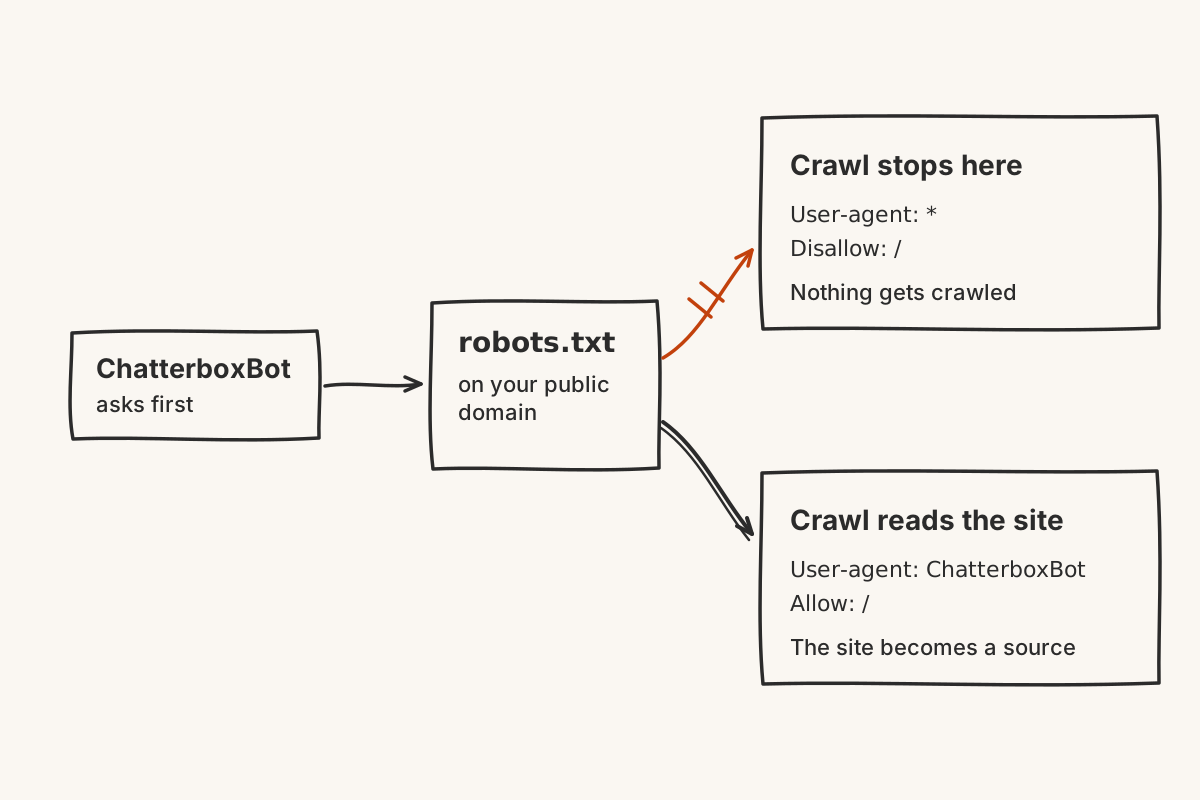
Add it to the site's robots.txt, save the file, and open the public URL again to confirm that the new lines are actually being served. On a site with page caching, a content delivery network, or separate staging and production deployments, editing a local file is not the same as proving that a visitor can fetch the changed version.
Keep the change narrow. You do not need to remove every crawler rule or open a staging site to the whole web. The purpose of the named block is to state what this crawler may read without changing the policy for unrelated crawlers.
If someone else maintains the site, send them the exact two-line rule and the public robots.txt URL. That gives them a specific change to review instead of a vague report that “the AI is not working.”
What should you do after changing robots.txt?
Run the website source crawl again. Chatterbox permits a source to be re-crawled once a day, so plan the access fix and any page edits together if that source was already crawled recently.
Then inspect what entered the knowledge base. Chatterbox can build knowledge from a site crawl, a file upload, pasted text, or hand-typed question-and-answer pairs. Fixing crawler access makes the website available as a source; it does not prove that every important answer is on the site.
Ask one question whose answer appears clearly on a crawled page. Chatterbox shows the source passage behind each answer, so confirm that the result points to the page you intended. Next, ask one question the site does not answer. The widget should say it cannot find the answer and ask for contact details rather than inventing one.
What if the crawl works but useful answers are still missing?
Separate access problems from content problems. A successful crawl can still read a site that never states its service area, cancellation terms, prices, or opening hours. It can also read two pages that disagree.
Use the source passage shown with an answer to trace what the chatbot found. Correct or remove stale website copy at its source. If an approved answer does not belong on a public page, add it through a file, pasted text, or manual Q&A instead.
The useful sequence is simple: let the crawler in, verify the pages it read, test one known answer, and test one honest refusal. A crawl that starts is only the first check. A chatbot is ready when the source is current and the missing answer still reaches a person.